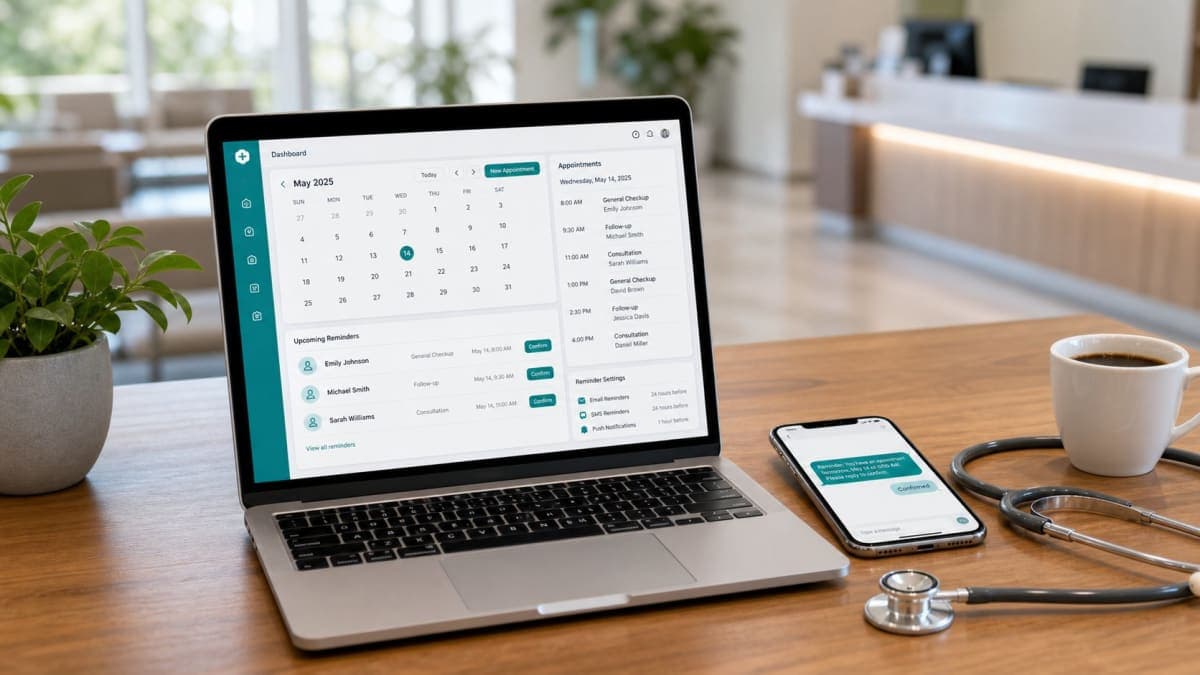
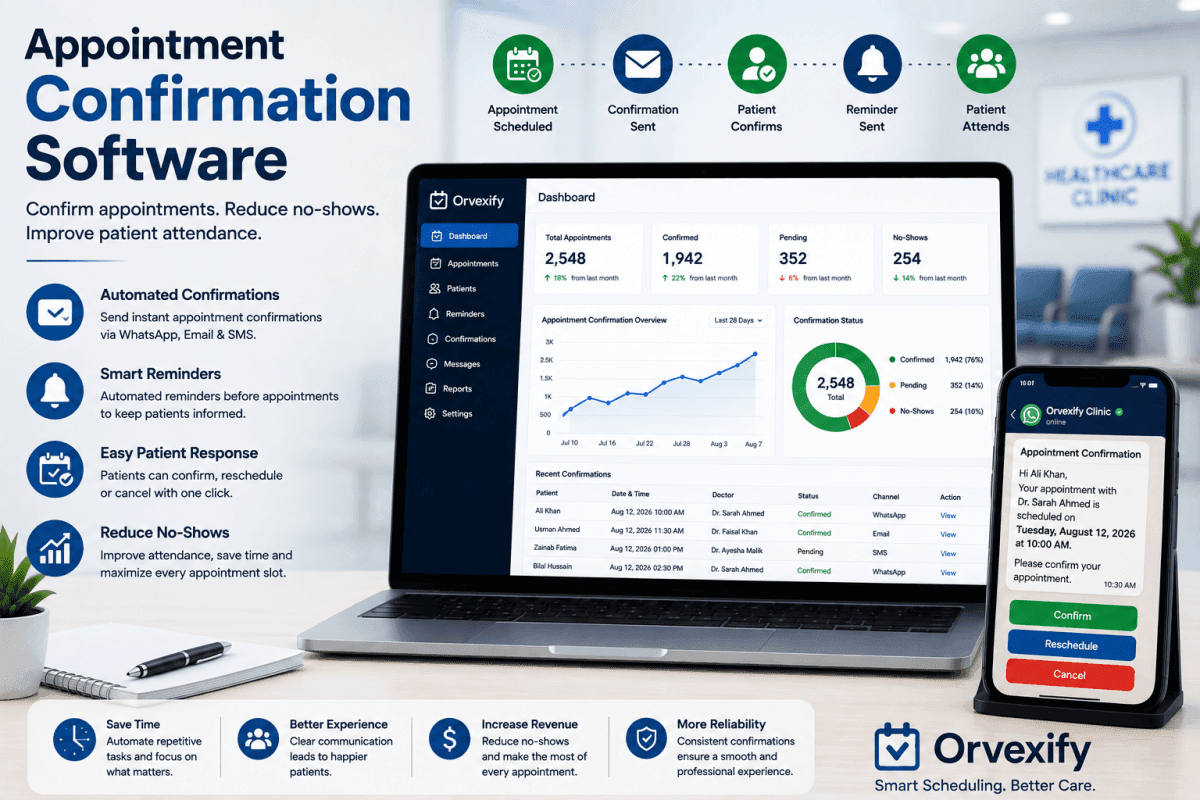
For many healthcare clinics, getting a patient to book an appointment is only the first step.
The bigger challenge is making sure the patient actually remembers the appointment, confirms it, and arrives on time.
A patient may schedule an appointment several days or weeks in advance and genuinely intend to attend. But between the time of booking and the appointment date, plans can change, schedules can become busy, reminders can be forgotten, or patients may simply lose track of the appointment.
This is where appointment confirmation software can make a significant difference.
Instead of relying entirely on staff members to manually call patients, send messages, or check confirmations, clinics can use software to automate the confirmation process. Patients can receive timely reminders and confirmation requests while staff get a clearer view of which appointments are confirmed, pending, cancelled, or require follow-up.
For healthcare administrators, this can mean fewer manual tasks, better appointment visibility, improved patient communication, and potentially fewer missed appointments.
In this guide, we will explain what appointment confirmation software is, how it works, which features matter most, how it can help clinics, and what to consider when choosing a solution.
What Is Appointment Confirmation Software?
Appointment confirmation software is a digital system that helps healthcare organizations automatically communicate with patients about upcoming appointments and collect confirmation responses.
Instead of requiring administrative staff to contact every patient individually, the software can send automated messages according to the clinic's scheduling workflow.
For example, after a patient books an appointment, the system may send a confirmation message containing:
- Patient appointment date
- Appointment time
- Doctor or provider information
- Clinic details
- Confirmation instructions
- Cancellation or rescheduling information
- Additional appointment reminders
Depending on the system, patients may be able to confirm their appointment directly through a link, message, or other communication channel.
This creates a more organized process for both the patient and the clinic.
A confirmation system can also work alongside broader appointment scheduling and reminder workflows. For example, a clinic may send an initial confirmation after booking, followed by a reminder 24 hours before the appointment and another reminder closer to the appointment time.
This type of workflow is especially useful for clinics handling a high volume of appointments.
Why Appointment Confirmation Matters for Healthcare Clinics
Missed appointments create more than an empty time slot on a calendar.
When a patient does not attend, the clinic may lose revenue, staff time, and an opportunity to serve another patient.
There can also be administrative costs associated with managing missed appointments, contacting patients, rescheduling visits, and keeping schedules organized.
The problem becomes more difficult when a clinic manages hundreds or thousands of appointments every month.
Manual confirmation processes may require staff to:
- Review upcoming appointments
- Identify which patients need confirmation
- Contact each patient
- Record responses
- Follow up with patients who do not respond
- Update appointment records
- Contact patients again when appointments are cancelled or rescheduled
This process can consume significant administrative time.
Automation allows clinics to standardize many of these steps.
Instead of depending on staff members to remember every confirmation, the software can trigger communications based on appointment information and predefined rules.
This is one reason appointment confirmation is becoming an important part of modern healthcare scheduling.
Clinics that are already exploring healthcare scheduling software can also benefit from connecting confirmation workflows with their broader scheduling process.
How Appointment Confirmation Software Works
The basic process is relatively simple.
Step 1: The appointment is scheduled
A patient books an appointment through the clinic's scheduling system, website, staff, or another booking channel.
The appointment information is stored in the clinic's system.
Step 2: The system identifies the upcoming appointment
The confirmation software recognizes that the appointment requires communication based on the clinic's configured rules.
For example, the clinic might choose to send a confirmation immediately after booking.
Step 3: The patient receives a confirmation message
The patient receives an automated message containing relevant appointment details.
The message should be short, clear, and easy to understand.
Step 4: The patient confirms or takes another action
The patient can confirm the appointment or, depending on the system, request cancellation or rescheduling.
Step 5: The clinic sees the response
The administrative team can view appointment status and identify patients who have not confirmed.
This makes it easier to prioritize follow-up.
Step 6: Additional reminders can be sent
A confirmation does not necessarily replace reminders.
A clinic may still send additional reminders before the appointment.
This is where confirmation software can work alongside patient appointment reminders and broader reminder automation.
Appointment Confirmation vs Appointment Reminder
These terms are closely related, but they are not exactly the same.
An appointment confirmation is primarily designed to establish whether the patient still intends to attend.
An appointment reminder is designed to help the patient remember the appointment.
For example:
Confirmation message:
"Your appointment with Dr. Smith is scheduled for Tuesday, August 18 at 10:00 AM. Please confirm your appointment."
Reminder message:
"Reminder: You have an appointment with Dr. Smith tomorrow at 10:00 AM."
Both messages can serve an important purpose.
A strong patient communication workflow may use both.
For clinics looking to understand the broader role of reminders, see Patient Appointment Reminders: The Complete Guide for Modern Healthcare Clinics (2026).
The key idea is that confirmation and reminders should work together rather than being treated as completely separate processes.
Benefits of Appointment Confirmation Software
1. Reduce Manual Administrative Work
One of the most immediate benefits of automation is reducing repetitive work.
Instead of staff members manually contacting patients about every appointment, automated software can handle routine confirmation messages.
This allows administrative teams to spend more time on tasks that require human attention.
For example, staff can focus on:
- Patients who need special assistance
- Complex scheduling requests
- Rescheduling
- Insurance questions
- New patient onboarding
- Patients who have not responded
- Same-day appointment issues
Automation does not necessarily eliminate administrative work.
Instead, it can help staff focus their time where it matters most.
2. Improve Patient Communication
Patients increasingly expect healthcare communication to be convenient and timely.
A confirmation message gives patients an easy way to review their appointment details before the scheduled visit.
This can reduce uncertainty around:
- Date
- Time
- Provider
- Appointment type
- Clinic location
- Scheduling status
Clear communication can also make the overall patient experience more organized.
3. Help Reduce Missed Appointments
One of the biggest reasons clinics consider appointment confirmation software is the potential to reduce missed appointments.
Patients can forget appointments, misunderstand scheduling information, or become busy before their visit.
Automated confirmations provide another communication point between the clinic and the patient.
When patients are asked to confirm their appointments, clinics can also identify appointments that may require attention.
For more strategies, see How to Reduce Patient No-Shows With Automation.
4. Give Staff Better Visibility
A manual confirmation process can make it difficult to understand the status of hundreds of appointments.
An automated system can organize appointments according to their current status.
For example:
- Confirmed
- Pending confirmation
- Cancelled
- Reschedule requested
- Reminder sent
- No response
This can give administrators a clearer picture of the upcoming schedule.
Better visibility can help staff identify potential problems earlier instead of discovering an empty appointment slot after the scheduled time has passed.
5. Support Better Scheduling
Appointment confirmation is also connected to scheduling efficiency.
When patients cancel early enough, a clinic may have an opportunity to offer that appointment slot to another patient.
This can be particularly useful for clinics with high demand.
For example, if a patient confirms they cannot attend several days before the appointment, staff may be able to reschedule them and offer the original slot to someone else.
That is very different from discovering a missed appointment after the patient fails to arrive.
Key Features to Look for in Appointment Confirmation Software
Not every software solution offers the same functionality.
Healthcare administrators should evaluate the system based on the clinic's actual workflow.
Automated Confirmation Messages
The first feature to look for is reliable automated communication.
The software should allow the clinic to configure when confirmation messages are sent.
Examples include:
- Immediately after booking
- Several days before the appointment
- 24 hours before the appointment
- A few hours before the appointment
The ideal timing depends on the clinic and appointment type.
Multiple Reminder Options
Confirmation should ideally be part of a larger reminder workflow.
Look for systems that support different reminder intervals.
For example, a clinic might use:
24-hour reminder:
Sent one day before the appointment.
2-hour reminder:
Sent shortly before the appointment.
A flexible reminder system gives clinics more control over their communication strategy.
Patient Confirmation Tracking
The system should make it easy to identify whether a patient has responded.
Administrators should not have to search through individual messages to determine who confirmed.
A centralized dashboard can make this process much easier.
Cancellation and Rescheduling
Confirmation software becomes even more useful when patients can take action.
If a patient cannot attend, they should ideally have a simple way to communicate that.
Depending on the system, this may allow the clinic to:
- Cancel the appointment
- Reschedule the patient
- Contact the patient
- Offer the slot to another patient
This can help clinics manage their schedules more efficiently.
Automated Patient Reminders
Confirmation and reminders should work together.
A patient may confirm an appointment on Monday but still forget it by Friday.
That is why clinics may want a workflow that combines confirmation with automated reminders.
You can learn more in Best Appointment Reminder Software for Clinics.
WhatsApp and Messaging Support
Different patient populations prefer different communication channels.
Some patients may respond better to traditional messages, while others regularly use WhatsApp.
A healthcare communication platform that supports appropriate messaging channels can make it easier for clinics to communicate with patients.
However, clinics should always evaluate privacy, consent, security, and applicable regulatory requirements before selecting communication channels.
How to Build an Effective Appointment Confirmation Workflow
Simply installing software is not enough.
The workflow needs to be designed carefully.
A basic example might look like this:
Booking
Patient books an appointment.
↓
Immediate confirmation
The patient receives appointment details and a confirmation request.
↓
Confirmation tracking
The system records the response.
↓
Reminder
A reminder is sent before the appointment.
↓
Final reminder
A second reminder can be sent closer to the appointment if appropriate.
↓
Follow-up
Patients who have not confirmed can be identified for additional action.
This approach creates multiple opportunities for patients to remember and manage their appointments.
Example Workflow for a Modern Clinic
Imagine a clinic schedules a patient for Monday at 2:00 PM.
The clinic could configure the following workflow:
Immediately after booking
"Your appointment is scheduled for Monday at 2:00 PM. Please confirm your appointment."
24 hours before
"Reminder: Your appointment is tomorrow at 2:00 PM."
2 hours before
"Reminder: Your appointment is today at 2:00 PM."
If the patient cancels, the clinic can update the schedule and potentially offer the appointment to another patient.
This is much more structured than relying on staff to manually remember every patient.
Appointment Confirmation Software and Patient No-Shows
No-shows are a major scheduling challenge for many healthcare organizations.
There is rarely one single reason why patients miss appointments.
Patients may:
- Forget the appointment
- Have conflicting commitments
- Experience transportation problems
- Become ill
- Misunderstand the appointment time
- Experience work or family responsibilities
- Decide not to attend but fail to notify the clinic
Because the causes vary, clinics should avoid relying on a single solution.
Confirmation software addresses one important part of the problem: communication.
By creating a structured process for confirming appointments and reminding patients about upcoming visits, clinics can reduce the chances that an appointment is forgotten.
For a broader discussion of the problem, see Why Patients Miss Appointments and How Clinics Can Prevent It.
Why Automation Is Better Than Manual Confirmation
Manual confirmation can work for a very small practice.
But as appointment volume grows, manual processes become increasingly difficult to maintain.
Consider a clinic with 500 appointments per month.
If staff spend only a few minutes contacting each patient, the total administrative time can become substantial.
Automation can handle repetitive communication while staff focus on exceptions.
This is an important distinction.
The goal is not necessarily to remove people from the process.
The goal is to reduce repetitive work and allow staff to focus on patients and situations that require human interaction.
How Much Does Appointment Confirmation Software Cost?
Pricing varies significantly depending on the provider and features.
Some platforms charge based on:
- Number of users
- Number of appointments
- Number of patients
- Messages sent
- Features included
- Monthly subscription
- Communication channels
Clinics should look beyond the monthly price.
A cheaper system may become expensive if it requires significant manual work.
Similarly, a more expensive system may provide greater value if it saves administrative time and improves scheduling efficiency.
When comparing solutions, calculate the overall value rather than looking only at the subscription price.
For example:
Software cost + staff time + communication costs + missed appointment impact
can provide a more realistic picture than subscription price alone.
What Should Clinics Look for When Choosing a Solution?
Before purchasing appointment confirmation software, healthcare administrators should consider several questions.
Does it support automated confirmations?
The system should be able to send confirmations automatically according to your workflow.
Can patients easily respond?
The confirmation process should be simple.
If patients have to complete a complicated process, response rates may suffer.
Can staff see confirmation status?
Administrators should be able to quickly identify confirmed and unconfirmed appointments.
Does it support reminders?
Confirmation alone may not be enough.
Look for a solution that can support a broader reminder strategy.
Can the system handle cancellations?
Patients should have a straightforward way to communicate when they cannot attend.
Does it integrate with your workflow?
A system that requires constant manual data entry can reduce the value of automation.
Is it easy for staff to use?
Healthcare staff should not need extensive technical knowledge to manage everyday scheduling workflows.
Does it provide useful reporting?
Reporting can help administrators understand appointment patterns and identify areas for improvement.
Appointment Confirmation Software vs Manual Phone Calls
Both methods can have a role in healthcare.
Manual calls provide a personal experience and can be useful for complex situations.
However, they can be time-consuming.
Automated confirmation is more suitable for repetitive communication.
A clinic can therefore use a hybrid approach:
Automation for routine appointments
and
Human follow-up for patients who need additional assistance.
This approach can help balance efficiency with patient service.
How Orvexify Can Help Clinics Automate Appointment Communication
Orvexify is designed around appointment scheduling and patient communication workflows.
Instead of relying entirely on manual appointment follow-ups, clinics can use automation to manage reminders and appointment-related communication.
For clinics interested in improving their scheduling process, you can explore Best Clinic Scheduling Software in 2026.
Orvexify also provides appointment reminder functionality designed to help clinics communicate with patients before scheduled appointments.
Administrators who want to explore the available features can visit the Orvexify Features page.
For clinics evaluating whether an appointment scheduling and reminder solution fits their workflow, the Orvexify Pricing page provides another useful starting point.
If you are ready to explore the platform, you can also visit the Orvexify Contact page.
The important point is that appointment confirmation should not exist in isolation.
It should be part of a broader system that helps clinics manage bookings, reminders, patient communication, and appointment attendance.
Best Practices for Appointment Confirmation Messages
The message itself matters.
A good confirmation message should be:
- Clear
- Short
- Easy to understand
- Timely
- Action-oriented
Avoid unnecessary information.
For example:
"Your appointment with Dr. Ahmed is scheduled for Tuesday, August 18 at 10:00 AM. Please confirm your appointment using the link below."
This is much easier to understand than a long message containing unnecessary details.
Clinics should also make sure patients know what to do if they cannot attend.
For example:
"If you cannot attend, please cancel or reschedule your appointment as soon as possible."
Clear instructions can make the communication more useful.
Common Mistakes Clinics Should Avoid
Sending Too Many Messages
Automation does not mean sending messages constantly.
Too many notifications can frustrate patients.
The communication schedule should be useful rather than excessive.
Making Confirmation Difficult
If confirmation requires several steps, patients may ignore it.
The process should be as simple as possible.
Ignoring Unconfirmed Appointments
A confirmation system is most useful when the clinic actually monitors responses.
If a patient does not respond, the clinic should have an appropriate follow-up workflow.
Using the Same Message for Every Situation
A new patient appointment may require different information from a routine follow-up.
Clinics should consider customizing messages according to appointment type when necessary.
Forgetting About Cancellations
Confirmation software should ideally support cancellation and rescheduling workflows.
Otherwise, patients may still contact staff through multiple channels.
How Appointment Confirmation Can Improve Clinic Efficiency
Clinic efficiency is not only about seeing more patients.
It is also about reducing unnecessary administrative work and making better use of available appointment capacity.
A well-designed confirmation workflow can help clinics:
- Reduce repetitive communication
- Identify potential cancellations earlier
- Improve schedule visibility
- Give patients clearer appointment information
- Reduce manual follow-up
- Support reminder workflows
- Improve administrative organization
These improvements can add up over time.
Even small efficiency gains can matter when a clinic handles hundreds or thousands of appointments.
The Connection Between Confirmation, Reminders and No-Show Prevention
The strongest appointment communication strategies usually combine several elements.
Confirmation answers:
"Does the patient still plan to attend?"
Reminder answers:
"Do you remember your upcoming appointment?"
Cancellation and rescheduling answer:
"Can the appointment be changed if the patient cannot attend?"
Follow-up answers:
"What should the clinic do when there is no response?"
Together, these processes create a more complete appointment management workflow.
Clinics interested in reducing missed appointments can also read How to Reduce Patient No-Shows With Automation for a broader overview.
Is Appointment Confirmation Software Worth It?
For many clinics, the answer depends on appointment volume, administrative workload, and the cost of missed appointments.
A small practice with a low appointment volume may be able to manage confirmations manually.
But as a clinic grows, automation becomes increasingly valuable.
The question should not simply be:
"How much does the software cost?"
Instead, ask:
"How much time and opportunity can better appointment communication save?"
If the system reduces repetitive administrative work, improves visibility, supports patient communication, and helps clinics manage cancellations earlier, it can provide value beyond the software subscription itself.
Final Thoughts
Appointment confirmation software can turn a repetitive manual process into a structured and automated workflow.
For healthcare clinics, the goal is not simply to send more messages.
The goal is to communicate with patients at the right time, make confirmation easy, identify potential scheduling problems early, and give staff better visibility into upcoming appointments.
When confirmation is combined with automated reminders, cancellation management, scheduling, and patient communication, clinics can create a much more efficient appointment management process.
The right system should be easy for staff to manage and simple for patients to use.
If your clinic is currently relying on manual calls or scattered messages to confirm appointments, this may be a good time to evaluate whether automation can improve the process.
Explore Best Appointment Reminder Software for Clinics to understand the wider software landscape, or review The Complete Guide to Improving Patient Attendance and Clinic Efficiency for additional strategies.
And if you are looking for a platform that combines appointment management with automated patient reminders, explore Orvexify and see whether it fits your clinic's workflow.
Better appointment communication starts with a simple process: make the appointment clear, make confirmation easy, and give patients timely reminders.