Patient no-shows are one of the most frustrating operational problems healthcare clinics face.
A patient books an appointment. The clinic reserves the time. Staff prepare for the visit. The provider keeps the appointment slot available. Then the appointment time arrives, and the patient never shows up.
There is no consultation. There is no revenue from that appointment. And in many cases, the clinic loses an opportunity to serve another patient.
While occasional missed appointments are unavoidable, a large number of no-shows can become a serious operational and financial problem for a healthcare organization.
The good news is that many no-shows are preventable.
Patients may forget appointments, misunderstand the appointment time, become busy, fail to receive a confirmation, or simply lose track of a booking made several days or weeks earlier.
This is where automation can make a major difference.
Instead of relying entirely on staff to manually call or message every patient, clinics can use automated appointment reminders and scheduling workflows to keep patients informed before their appointments.
In this guide, we will explain how to reduce patient no-shows with automation, which reminder strategies work best, what features healthcare administrators should look for in appointment reminder software, and how a modern automated system can improve both patient attendance and clinic efficiency.
Why Patient No-Shows Are a Serious Problem for Healthcare Clinics
A missed appointment may look like a small issue when viewed individually.
But when a clinic has dozens or hundreds of appointments every week, even a relatively small percentage of missed appointments can create significant disruption.
For example, imagine a clinic schedules 500 appointments in one month.
If 10% of those appointments are missed, that means approximately 50 appointment slots were unused.
Those 50 slots could represent lost revenue, wasted provider time, unnecessary administrative work, and patients who could have been treated during those periods.
No-shows also affect more than revenue.
They can create:
- Empty provider schedules
- Lower staff productivity
- Longer waiting lists
- Delayed patient care
- Increased administrative workload
- Unpredictable daily schedules
- Reduced clinic capacity
- More last-minute appointment management
For healthcare administrators, reducing no-shows is therefore not simply a communication issue.
It is an operational efficiency issue.
A clinic that consistently improves appointment attendance can potentially make better use of its existing staff, providers, rooms, and available appointment slots.
What Causes Patients to Miss Appointments?
Before choosing a solution, it is important to understand why patients fail to attend appointments.
Not every missed appointment happens for the same reason.
Some patients genuinely forget. Others may have scheduling conflicts. Some may not receive enough information about their appointment. Others may intend to attend but fail to confirm or reschedule when their plans change.
Common reasons include:
1. Patients Forget the Appointment
This is one of the simplest problems to address.
If a patient books an appointment two or three weeks in advance, remembering the exact date and time can be difficult.
A simple automated reminder can bring the appointment back to the patient's attention.
2. Appointments Are Booked Too Far in Advance
Long gaps between booking and appointment dates increase the possibility that patients will forget.
Automated reminders can maintain communication throughout that period.
3. Patients Have Scheduling Conflicts
A patient's work schedule, family responsibilities, travel plans, or other commitments can change after an appointment is booked.
If the clinic gives patients an easy way to confirm, cancel, or reschedule, the clinic has a better chance of filling the appointment slot.
4. Patients Do Not Receive Confirmation
Patients may be unsure whether their appointment was successfully booked.
An automated confirmation immediately after booking can eliminate this uncertainty.
5. Communication Is Inconsistent
Some clinics depend on manual phone calls.
This can work for a small practice, but as appointment volume grows, manually contacting every patient becomes difficult.
A centralized automated system can make communication more consistent.
For additional strategies, clinics can also explore Why Patients Miss Appointments and How Clinics Can Prevent It, which covers common causes and practical prevention methods.
How Automation Helps Reduce Patient No-Shows
Automation does not simply mean sending one reminder.
A properly designed appointment reminder workflow can communicate with patients at multiple stages of the appointment journey.
For example:
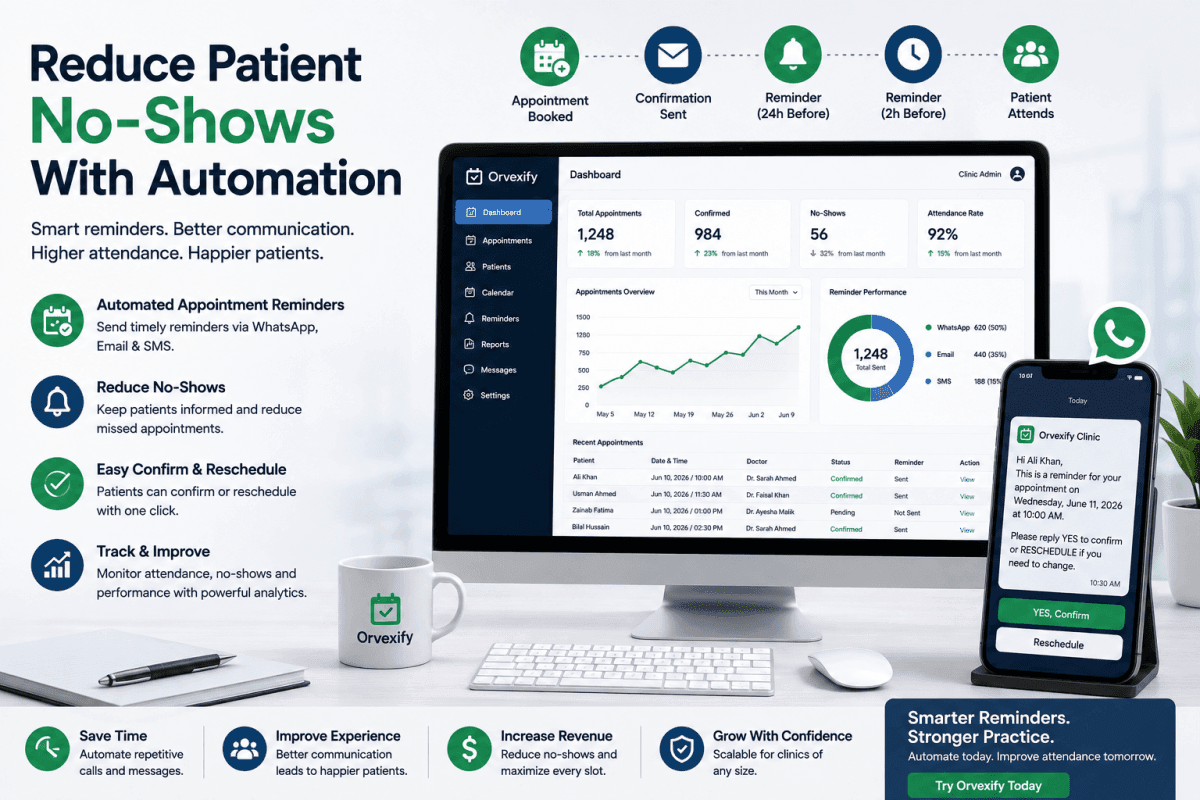
Appointment booked → Confirmation → Reminder → Final reminder → Appointment → Follow-up
This creates a predictable communication process without requiring staff to manually manage every message.
A clinic can configure automated reminders based on the appointment date and time.
For example:
- Immediately after booking
- 24 hours before the appointment
- 2 hours before the appointment
- On the day of the appointment
- After a missed appointment
The exact workflow can depend on the clinic's needs.
The key advantage is consistency.
Every eligible patient receives the appropriate communication without staff members having to remember who needs a reminder.
This is one reason automated appointment reminders have become an important part of modern healthcare scheduling.
Clinics interested in the broader role of reminders can also read Patient Appointment Reminders: The Complete Guide for Modern Healthcare Clinics (2026).
1. Send an Immediate Appointment Confirmation
The first automated message should confirm that the appointment has been successfully scheduled.
This message can include:
- Patient name
- Appointment date
- Appointment time
- Provider name
- Clinic name
- Location
- Important instructions
- Contact information
- Rescheduling information
The purpose is simple.
The patient should immediately know that the appointment exists and understand exactly when it is scheduled.
This also gives the clinic an opportunity to correct scheduling mistakes early.
If the patient notices that the date or time is incorrect, they can contact the clinic before the appointment day instead of becoming a no-show.
2. Use a 24-Hour Appointment Reminder
A reminder approximately one day before the appointment is one of the most useful stages in an automated workflow.
By this point, patients have had time to forget the appointment.
A reminder brings it back to their attention while still giving them enough time to respond.
A useful reminder can say:
"Your appointment with the clinic is scheduled for tomorrow at 10:00 AM. Please confirm your appointment or contact the clinic if you need to reschedule."
The message should be short, clear, and actionable.
The objective is not to overwhelm the patient with information.
The objective is to make the appointment difficult to forget.
3. Add a Same-Day or Two-Hour Reminder
For some clinics, a second reminder shortly before the appointment can provide an additional layer of protection.
For example, a clinic may send another reminder two hours before the appointment.
This can be particularly useful for appointments scheduled during busy working hours.
Patients may see the earlier reminder but become distracted later in the day.
A second reminder creates another opportunity for the appointment to remain visible.
A reminder sequence might therefore look like:
Booking → Confirmation → 24-hour reminder → 2-hour reminder
This is much more reliable than expecting a patient to remember a booking without communication.
4. Make Confirmation Easy
A reminder is more useful when the patient can take action.
Instead of simply saying:
"Your appointment is tomorrow."
The system should ideally allow patients to confirm or communicate with the clinic easily.
For example:
- Confirm appointment
- Need to reschedule? Contact the clinic.
The easier it is for patients to respond, the more useful the reminder workflow becomes.
A confirmation process also provides the clinic with valuable information.
If a patient cannot attend, the clinic may have an opportunity to offer the slot to someone else.
This turns appointment reminders from simple notifications into a practical scheduling tool.
5. Give Patients a Way to Reschedule
One of the biggest mistakes clinics can make is treating every missed appointment as a patient behavior problem.
Sometimes patients genuinely cannot attend.
The problem is what happens next.
If patients have no easy way to communicate that they cannot attend, they may simply fail to show up.
An automated reminder workflow can encourage patients to reschedule instead.
For example:
"Unable to attend? Please contact the clinic to reschedule your appointment."
This simple approach can help convert some potential no-shows into cancellations or rescheduled appointments.
That distinction matters.
A cancelled appointment can potentially be given to another patient.
A no-show creates an empty appointment slot after the fact.
Clinics can explore more strategies in How to Reduce Appointment Cancellations in Clinics.
6. Automate Patient Communication Instead of Relying on Manual Calls
Manual reminder calls can consume a significant amount of staff time.
Consider a clinic with hundreds of appointments every month.
If employees need to manually identify upcoming appointments, find patient contact information, call patients, record responses, and repeat the process every day, the workload quickly becomes difficult to manage.
Automation removes much of this repetitive work.
Once the workflow is configured, reminders can be triggered automatically according to appointment data.
This allows staff to spend more time on tasks that actually require human attention.
For clinics looking to modernize their scheduling operations, Best Clinic Scheduling Software in 2026 provides a broader look at how technology can improve appointment management.
7. Use Multiple Communication Channels
Different patients prefer different communication methods.
Some patients respond quickly to email.
Others are more likely to notice a message on WhatsApp or another messaging channel.
For this reason, modern appointment reminder systems can support multiple communication options depending on the clinic's setup and patient preferences.
Possible channels include:
- Patient portal notifications
The goal is not necessarily to send the same message everywhere.
The goal is to make sure the patient receives important appointment information through an appropriate channel.
For clinics specifically interested in automated communication, How Automated Appointment Reminders Increase Patient Attendance provides a useful starting point.
8. Segment Reminder Workflows by Appointment Type
Not every appointment needs exactly the same reminder workflow.
A general consultation may have different requirements from:
- Dental appointments
- Physiotherapy sessions
- Follow-up consultations
- Diagnostic appointments
- Specialist appointments
- Telehealth visits
- Long appointments
- New patient consultations
A flexible appointment reminder system can allow clinics to create workflows according to their operational requirements.
For example, a clinic may want a different reminder schedule for first-time patients than returning patients.
The more relevant the communication, the more useful it becomes.
9. Automate Reminders for New and Returning Patients
New patients often need more information than returning patients.
A first-time patient may need:
- Clinic address
- Parking instructions
- Required documents
- Arrival instructions
- Provider information
- Preparation instructions
A returning patient may only need the appointment date and time.
Automation can help clinics create different communication workflows without requiring staff to manually customize every message.
This improves consistency while reducing administrative effort.
10. Use Automation to Identify Potential No-Shows
The best appointment reminder system does more than send messages.
It should help clinics understand what is happening with appointments.
For example, administrators may want to know:
- How many appointments were booked?
- How many were confirmed?
- How many were cancelled?
- How many were rescheduled?
- How many were missed?
- Which providers have higher no-show rates?
- Which appointment types have more missed visits?
- Which reminder workflows perform better?
These insights can help clinics make better operational decisions.
Automation therefore becomes not just a communication tool, but part of the clinic's overall appointment management strategy.
What Features Should You Look for in Appointment Reminder Software?
If your clinic is considering purchasing appointment reminder software, do not choose a platform based solely on whether it can send reminders.
There are several features worth evaluating.
Automated Appointment Reminders
The core requirement is reliable automated reminders.
The system should be able to trigger messages based on appointment dates and times without requiring staff intervention for every appointment.
Appointment Confirmation
Patients should have a simple way to confirm appointments whenever possible.
Scheduling Integration
The reminder system should work naturally with your appointment workflow.
A disconnected reminder tool can create more administrative work instead of reducing it.
Multiple Reminder Intervals
Look for flexibility around reminder timing.
For example:
- Immediate confirmation
- 24-hour reminder
- 2-hour reminder
- Same-day reminder
Different clinics may need different workflows.
Patient Communication
The platform should make it easy for clinics to communicate important appointment information.
Reporting and Analytics
Healthcare administrators need visibility into appointment performance.
Reporting can help identify patterns in cancellations and no-shows.
Easy Setup
A complicated system can reduce adoption.
The software should be practical for clinic staff and should not require a large technical team just to manage basic appointment reminders.
How Orvexify Can Help Clinics Reduce Patient No-Shows
For clinics looking for a practical way to automate appointment communication, Orvexify is designed around appointment scheduling, reminders, and patient management.
Instead of relying entirely on manual reminder calls, clinics can use automated workflows to keep patients informed before appointments.
Orvexify can help clinics organize their appointment process around automated communication and reminder workflows.
You can learn more about the platform's capabilities on the Orvexify Features page.
The goal is straightforward:
Help clinics spend less time chasing appointments and more time managing patient care.
For healthcare administrators, the value of automation is not simply sending more messages.
The real value is reducing repetitive administrative work while creating a more consistent appointment experience.
Why Clinics Should Consider Appointment Reminder Software
A clinic can technically manage reminders manually.
But the question is whether manual management remains efficient as the clinic grows.
Suppose a practice starts with 30 appointments per week.
Manual calls may be manageable.
Now imagine the same practice grows to 300 appointments per week.
The reminder workload grows with it.
This creates a scalability problem.
Appointment reminder software can handle repetitive communication automatically, allowing the clinic to maintain a consistent process even as appointment volume increases.
This is especially useful for:
- Medical clinics
- Dental practices
- Physiotherapy clinics
- Specialist practices
- Multi-provider clinics
- Healthcare groups
- Private practices
If you are comparing different solutions, Best Appointment Reminder Software for Clinics can help you understand the most important factors before choosing a platform.
Automation Can Improve More Than No-Show Rates
The benefits of appointment automation extend beyond preventing missed appointments.
A well-designed scheduling and reminder workflow can also help clinics improve:
Staff Productivity
Staff spend less time performing repetitive reminder tasks.
Patient Experience
Patients receive timely information instead of having to remember every appointment detail themselves.
Scheduling Efficiency
Patients who cannot attend can potentially notify the clinic earlier.
Provider Utilization
Fewer empty appointment slots can help providers make better use of their schedules.
Administrative Visibility
Reports can help administrators understand appointment patterns.
Operational Consistency
Every appointment can follow a standardized communication workflow.
These improvements can collectively contribute to a more efficient clinic.
For a broader overview, see The Complete Guide to Improving Patient Attendance and Clinic Efficiency.
How to Build an Effective No-Show Prevention Workflow
A simple workflow for a modern clinic could look like this:
Step 1: Patient Books Appointment
The appointment is created in the scheduling system.
Step 2: Confirmation Is Sent
The patient receives confirmation with the appointment details.
Step 3: 24-Hour Reminder
The patient receives an automated reminder one day before the appointment.
Step 4: Patient Confirms or Requests Changes
The patient can confirm the appointment or contact the clinic if they cannot attend.
Step 5: Final Reminder
A second reminder can be sent closer to the appointment.
Step 6: Appointment Takes Place
The patient attends the scheduled appointment.
Step 7: Missed Appointment Workflow
If the patient does not attend, the clinic can follow up and encourage rescheduling.
This type of structured workflow creates a predictable system rather than leaving reminders to individual staff members.
Why Timing Matters in Patient Reminders
Sending a reminder too early may not be enough.
If a patient receives a reminder three weeks before an appointment, they may still forget it by the appointment date.
Sending a reminder only a few minutes before the appointment may also be too late.
This is why multiple reminder stages can be useful.
A combination such as:
Confirmation + 24-hour reminder + 2-hour reminder
creates multiple opportunities for the patient to remember the appointment.
Clinics can then adjust the workflow based on their own attendance data.
Do Automated Reminders Guarantee Zero No-Shows?
No.
No system can guarantee that every patient will attend every appointment.
Patients can still become sick, face emergencies, have transportation problems, change plans, or simply fail to attend.
The goal of automation is not to eliminate every possible no-show.
The goal is to reduce preventable no-shows and make appointment management more efficient.
This distinction is important.
A good system should help clinics reduce avoidable missed appointments while also giving patients a convenient way to communicate when they genuinely cannot attend.
How to Measure Whether Automation Is Working
After implementing automated reminders, clinics should monitor their results.
Important metrics can include:
No-Show Rate
How many scheduled appointments are missed?
Cancellation Rate
How many appointments are cancelled before the appointment time?
Rescheduling Rate
How many patients move their appointment instead of simply missing it?
Confirmation Rate
How many patients confirm their upcoming appointments?
Appointment Volume
How many appointments are being managed through the system?
Attendance Rate
How many scheduled appointments are actually completed?
Tracking these numbers over time can help administrators determine whether their reminder strategy is producing measurable improvements.
What Healthcare Administrators Should Look for Before Buying Software
Choosing appointment reminder software is a business decision.
The cheapest tool is not always the best choice.
Healthcare administrators should consider the complete workflow.
Ask questions such as:
- Does the platform support automated reminders?
- Can reminder timing be customized?
- Can appointment information be managed easily?
- Can patients receive timely notifications?
- Does the system support reporting?
- Is the interface easy for staff to use?
- Can the platform scale as appointment volume grows?
- Does it fit the clinic's current scheduling process?
- What communication channels are supported?
- What does the pricing structure include?
The software should solve a real operational problem rather than simply adding another dashboard for staff to manage.
Why Investing in Automation Can Make Sense
Healthcare clinics already have limited staff time.
Using that time to manually perform repetitive tasks can become expensive as the practice grows.
Automation allows clinics to shift repetitive work from staff members to software.
Instead of asking:
"Which patients should we call today?"
The system can handle routine reminder delivery automatically.
Staff can then focus on exceptions and situations that require human involvement.
This is the fundamental business case for automation.
You are not simply paying for reminders.
You are investing in a more consistent appointment management process.
Start Reducing Preventable No-Shows
Patient no-shows will probably never disappear completely.
But clinics do not have to accept preventable missed appointments as an unavoidable part of healthcare operations.
Automated appointment reminders can help patients remember upcoming visits, confirm their appointments, communicate scheduling changes, and stay informed throughout the appointment journey.
For clinics ready to take the next step, Orvexify provides a practical platform for automating appointment reminders and reducing patient no-shows. You can also explore the Orvexify Features page and Pricing page to see how the platform fits your clinic's workflow.