Back to Blog
Clinic ManagementAppointment Scheduling

Email vs WhatsApp Reminders for Clinics: Which One Reduces No-Shows More?

Faheem EjazAugust 26, 20261 min read1 views
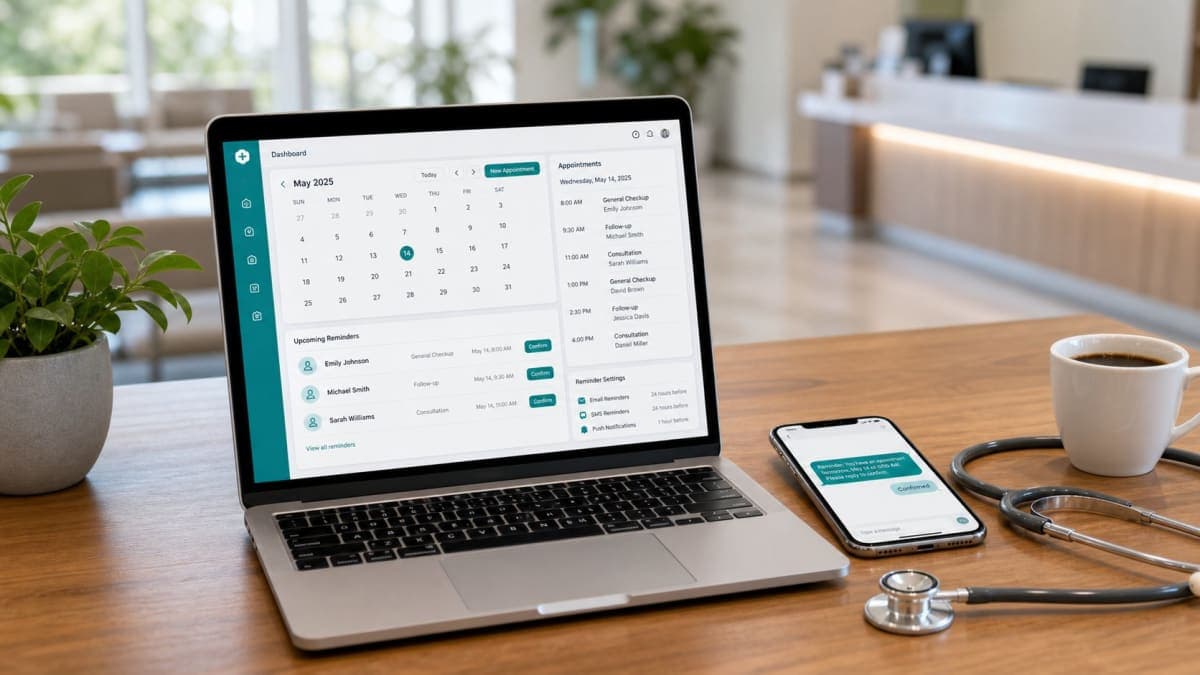
Healthcare professional using appointment reminder software on a modern dashboard with automated patient reminder notifications.

Missed appointments are one of the biggest revenue drains for healthcare clinics. A single no-show can mean:

  • Lost consultation revenue
  • Wasted appointment slots
  • Disrupted provider schedules
  • Delayed care for other patients

Most clinic owners know they need automated reminders — but choosing the right communication channel is where many get stuck.

Should you rely on email reminders? WhatsApp notifications? Both? And does the channel actually affect confirmation rates and no-show reduction?

This guide breaks down the real-world performance of email vs WhatsApp reminders — so clinic owners can make an informed decision based on their patient demographic and workflow. We'll also look at what the data from clinics using Orvexify shows about reminder effectiveness.

Why Patient Communication Matters for No-Show Reduction

Before diving into channel comparison, it helps to understand why patients miss appointments in the first place.

Patients miss appointments for predictable reasons — forgetting the date, scheduling conflicts, transportation issues, or simply not receiving timely reminders. Understanding these root causes is essential for choosing the right reminder strategy.

If you want a deeper dive into the root causes, read our guide on Why Patients Miss Appointments and How Clinics Can Prevent It — it covers the most common reasons and practical prevention methods.

The key insight: timely, clear communication is the most effective way to address forgetfulness and scheduling confusion. The channel you choose determines how quickly and effectively that communication lands.

Email Appointment Reminders — How They Work

Email reminders are automated notifications sent to patients before their appointments. They typically include:

  • Appointment date and time
  • Provider name
  • Clinic name and address
  • Preparation instructions (if needed)
  • Confirmation/rescheduling link

For a broader understanding of how reminder systems work, read our complete guide on Patient Appointment Reminder Software.

Benefits of Email Reminders

1. Detailed Communication

Email allows you to include comprehensive information — directions, parking instructions, required documents, fasting requirements, and more. Patients can reference the email anytime.

2. Formal Tone

For medical settings, email feels professional and appropriate — especially for specialized clinics like dermatology, cardiology, or surgical consultations.

3. Low Cost

Email is generally included with standard reminder systems at no extra per-message cost. This makes it an affordable option for clinics of all sizes.

4. Easy to Automate

Email integrations with scheduling software are well-established. Most reminder platforms handle email automatically based on appointment schedules.

5. Deliverability Tracking

You can track open rates, click-through rates, and delivery status — helping you measure effectiveness. Our Appointment Confirmation Software guide covers how confirmation tracking works in practice.

Limitations of Email Reminders

1. Variable Open Rates

Studies show average email open rates range from 15-30% depending on the industry and audience. Patients may miss important reminders buried in their inbox.

2. Spam Folder Risk

Reminders can sometimes end up in spam or promotions folders — meaning patients never see them.

3. Delayed Visibility

Email doesn't create the same immediate sense of urgency as WhatsApp. Patients may read it hours or days later.

4. Requires Active Checking

Patients must actively open their email — unlike WhatsApp which appears in an app they check regularly.

Best Use Cases for Email

  • Formal appointment confirmations immediately after booking
  • Pre-appointment instructions (what to bring, fasting, etc.)
  • Post-appointment follow-up information
  • Patients who prefer email communication

WhatsApp Appointment Reminders — How They Work

WhatsApp reminders are sent through WhatsApp Business API directly to the patient's phone. Messages can include:

  • Appointment date and time
  • Provider name and clinic name
  • Location and directions
  • Confirmation buttons (Confirm / Cancel / Reschedule)
  • Quick reply options

For a broader look at how automation is transforming healthcare scheduling, read How Automated Appointment Reminders Increase Patient Attendance.

Benefits of WhatsApp Reminders

1. High Engagement

WhatsApp has extremely high daily usage globally — billions of people use it daily. Messages are typically seen quickly, often within minutes.

2. Conversational & Interactive

Unlike email, WhatsApp supports two-way communication. Patients can reply directly to confirm, ask questions, or reschedule — all in the same thread.

3. Rich Information

WhatsApp supports longer messages, formatting, and even images or documents — so you can send appointment cards, maps, or preparation guides.

4. Immediate Visibility

WhatsApp notifications appear prominently on the phone — patients are more likely to see and act on them quickly.

5. Conversation Thread

WhatsApp creates a persistent conversation — patients can refer back to their appointment details anytime, reducing confusion.

6. Global Popularity

WhatsApp is dominant in many regions (Europe, Asia, Latin America, Middle East) — making it ideal for clinics with diverse patient populations.

Limitations of WhatsApp Reminders

1. App Dependency

Patients must have WhatsApp installed and active. While this is very common globally, some demographics may not use it.

2. Setup Requirements

WhatsApp Business API has setup requirements — including Facebook Business account, verification, and template approval for some message types.

3. Privacy Considerations

Some patients may have concerns about health-related communication on WhatsApp — though WhatsApp Business API provides enterprise-grade security.

4. Cost Per Message

WhatsApp Business API typically charges per message, which can vary by region and message type.

Best Use Cases for WhatsApp

  • Quick reminders (24h and 2h before appointment)
  • Two-way confirmation and rescheduling
  • Patients who respond better to messaging apps
  • Clinics with diverse patient populations

The Complete Picture: Patient Appointment Reminders

If you're new to appointment reminders altogether, start with our comprehensive guide on Patient Appointment Reminders: The Complete Guide for Modern Healthcare Clinics (2026). It covers everything from reminder types to best practices.

Email vs WhatsApp — Real-World Comparison

1. Confirmation Rates

Email: Lower confirmation rates typically. Patients may see the email but not respond — especially if the email is buried or the confirmation link is hard to find.

WhatsApp: Higher response rates. The conversational nature and easy reply/confirm options encourage patients to take action quickly.

Winner: WhatsApp (for confirmation rates)

2. No-Show Reduction

Email: Helps reduce no-shows — but effectiveness depends on patients actually opening and acting on the reminder.

WhatsApp: More effective at reducing no-shows. Higher visibility and faster response mean patients are more likely to remember and attend.

For a full strategy on reducing no-shows, check out How to Reduce Patient No-Shows With Automation — it covers reminder strategies, scheduling workflows, and more.

Winner: WhatsApp (marginally, for no-show reduction)

3. Patient Experience

Email: More formal and detailed. Appeals to patients who prefer comprehensive information and a professional tone.

WhatsApp: More casual and conversational. Appeals to patients who prefer quick, mobile-friendly communication.

Winner: Depends on patient demographic

4. Setup & Maintenance

Email: Simple to set up — most systems handle it automatically. Minimal ongoing maintenance.

WhatsApp: Requires API setup and verification — but once configured, runs similarly to email.

Winner: Email (for simplicity)

5. Cost

Email: Generally low cost — often included with reminder systems at no extra charge.

WhatsApp: Per-message costs — can add up for high-volume clinics, but still affordable for most.

Winner: Email (for cost)

The Winning Strategy: Use Both Channels Together

The best results come from combining email and WhatsApp reminders — not choosing one over the other.

This approach is what we recommend at Orvexify — and it's what most successful clinics are moving toward.

How Combined Reminders Work in Practice

  1. After booking: Send email confirmation with full details (date, time, provider, location, instructions)
  2. 24 hours before: Send WhatsApp reminder — quick, visible, easy to act on
  3. 2 hours before: Send another WhatsApp reminder — final prompt before appointment
  4. If no response: Follow up via email with rescheduling link

This multi-channel approach ensures:

  • Patients who prefer email get detailed information
  • Patients who prefer WhatsApp get quick, visible reminders
  • Backup coverage if one channel fails
  • Higher overall confirmation and attendance rates

How Orvexify Handles Reminders

Orvexify is built around email and WhatsApp appointment reminders — no SMS, no complexity, just full tracking and automation.

What Orvexify Does:

  • ✅ Automated email reminders — sent 24h and 2h before appointments
  • ✅ WhatsApp reminders — sent through WhatsApp Business API
  • ✅ Real-time confirmation tracking — see who confirmed, cancelled, or ignored
  • ✅ No-show analytics — track confirmation rates and identify patterns
  • ✅ Full patient management — centralized database with appointment history
  • ✅ Custom branded messages — add your clinic logo and branding

If you want to understand the full feature set, check out Orvexify Features — it covers everything from reminders to analytics.

What You Get:

  • Reduced no-shows (users report up to 70% reduction)
  • Saved staff time (no manual reminder calls)
  • Better patient communication
  • Organized appointment calendar
  • Detailed analytics to track improvement

For a full comparison of scheduling and reminder tools, read our guide on Best Clinic Scheduling Software in 2026 — it helps you evaluate what features matter most.

Which Channel Should Your Clinic Choose?

Choose Email If:

  • Your patients are older or prefer formal communication
  • You need to send detailed pre-appointment instructions
  • You want the simplest, lowest-cost setup
  • Your clinic has reliable email deliverability

Choose WhatsApp If:

  • Your patients are younger or tech-savvy
  • You want higher confirmation and response rates
  • Your clinic serves diverse demographics (WhatsApp popular globally)
  • You want two-way conversation with patients

Choose Both If:

  • You want maximum reach and effectiveness
  • Your patient population is diverse
  • You want backup coverage across channels
  • You're serious about reducing no-shows

Common Mistakes to Avoid

Many clinics purchase reminder software but fail to use it effectively. Avoid these common mistakes:

  • Sending reminders too late — timing matters. 24h and 2h reminders work best.
  • Using only one channel — different patients prefer different channels. Cover both.
  • Forgetting follow-up reminders — one reminder isn't enough for many patients.
  • Providing incomplete appointment details — include date, time, provider, and instructions.
  • Ignoring cancellation requests — make it easy for patients to cancel or reschedule.
  • Not reviewing reminder performance — track what's working and adjust.

For more on this topic, read Medical Appointment Reminder Software for Clinics — it covers best practices and common pitfalls.

Final Thoughts

There's no single "best" channel for appointment reminders — the right choice depends on your patients and your clinic's workflow.

Email remains valuable for formal, detailed communication. WhatsApp delivers higher engagement and faster responses. For most clinics, using both channels together gives the best results — maximizing reach and minimizing no-shows.

If you're looking for a simple, effective reminder system built around email and WhatsApp, Orvexify automates the entire workflow — so you can focus on patient care instead of manual follow-ups.

Start reducing no-shows today → orvexify.com

Tags

#Appointment Reminder Software#Email Appointment Reminders#WhatsApp Appointment Reminders#Automated Appointment Reminders#Patient Reminder Software#Reduce Patient No-Shows#Appointment Reminder System#Healthcare Appointment Reminders#Patient Appointment System
F

Faheem Ejaz

Passionate about writing and sharing knowledge

Frequently Asked Questions

Do email reminders actually reduce no-shows?
Yes. Email reminders help patients remember appointments and can reduce no-shows — but effectiveness depends on patients opening and acting on the reminder.
Are WhatsApp reminders better than email for clinics?
WhatsApp reminders typically have higher open and response rates — making them more effective for quick reminders and confirmations. However, email is better for detailed information.
Can clinics use both email and WhatsApp reminders?
Yes. Using both channels together gives the best results — email for detailed communication and WhatsApp for quick, visible reminders.
Does Orvexify support SMS reminders?
No. Orvexify focuses on email and WhatsApp reminders only — no SMS. This keeps the system simple and cost-effective.
How much do WhatsApp reminders cost?
WhatsApp Business API charges per message, with rates varying by region. Orvexify includes WhatsApp reminders as part of certain plans.
Can patients confirm appointments via WhatsApp?
Yes. Orvexify's WhatsApp reminders allow patients to confirm, cancel, or reschedule appointments directly through WhatsApp.

You Might Also Like

View All
Doctor using appointment reminder software to reduce patient no-shows
Clinic Management

How to Reduce No-Shows at MedSpas & Aesthetic Clinics with Automated Reminders

Practical ways to reduce no-shows at medspas and aesthetic clinics using automat...

Read More →
Male doctor using appointment reminder software to reduce no-shows at an urgent care clinic
Clinic Management

How to Reduce No-Shows at Urgent Care & Walk-in Clinics with Automated Reminders

Practical ways to reduce no-shows at urgent care and walk-in clinics using autom...

Read More →
Doctor using appointment reminder software to reduce patient no-shows
Clinic Management

How to Reduce No-Shows in Mental Health & Therapy Practices with Automated Reminders

Practical ways to reduce no-shows in mental health and therapy practices using a...

Read More →