
Confirmed is not a person in the doorway.
Someone tapped Confirm in the reminder email. The row went green. Reception stopped worrying. At 10:00 the chair is empty. That is not a software bug. That is the difference between a promise and attendance.
This is not an opened reminder is not a confirmed appointment. That page is the pixel. Gmail fetching a tiny image is not a tap. This page assumes they did tap. The tap still is not a body in the room.
It is not once they confirm or cancel, stop sending the same reminder. That page is what the next mail should be. It is not 24 hours, 2 hours, 30 minutes, not which timezone the mail prints, not phone bookings still needing the same email, and not confirm from email with no app. Those pages get the visit onto the list and answered. This page is what the answer is allowed to mean.
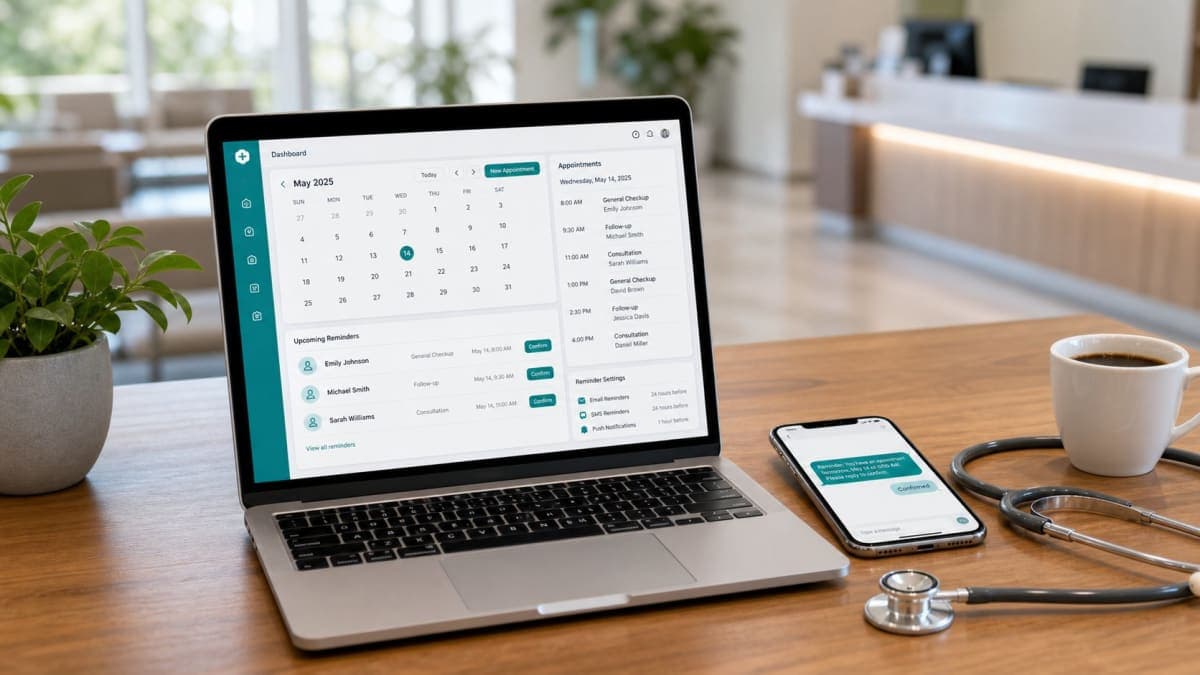
Orvexify is a booking page plus email reminders. Patients tap Confirm or Cancel in the mail. The dashboard shows pending, confirmed, cancelled. It does not show arrived. No patient app. No SMS. WhatsApp on Growth and Pro is coming soon. Reschedule from the mail is not live. There is no waitlist that texts the next person. We do not publish a 70% figure. We are not a check-in kiosk.
Confirm is a promise made yesterday
The 24-hour mail goes out. They tap Confirm while packing a bag, or while a child talks, or at 11pm in bed. That tap means: right now, I intend to sit in that chair.
Intent is not arrival.
Between the tap and the slot there is sleep, traffic, a school call, a worse symptom, a better one, a boss, a bus, a mood. People who fully meant it at 9pm still fail to walk in at 10am. Clinics know this from the phone era. A “yes” on a call the day before was never a body in the room either. The dashboard did not invent a new kind of yes. It made the old yes visible.
If you treat Confirmed as “they are coming, stop thinking,” you have used the product as a sedative. The useful reading is: they answered, they did not Cancel, the hour is still yours to prepare — and still yours to lose.
Why the green row feels like check-in
Front desk wants one fewer thing to hold in their head.
Pending is work: will they come, should we call, is the email even right. Cancelled is work: can we offer the hour. Confirmed looks like rest. The software used a strong word. “Confirmed” sounds like the airport, like a hotel, like the person already has a boarding pass.
It is not a boarding pass. It is a button in an email. No ID was checked. No clipboard. No “I am here.” They may be in another city. They may have tapped with a thumb and gone back to sleep.
Language does the damage. Staff say “they checked in” when they mean “they tapped Confirm.” Then the 10:00 no-show is a surprise, and the surprise feels like the reminder failed. The reminder did its job. It collected a promise. It did not sit them down.
Say the words you mean. Confirmed = they tapped. Arrived = they are in the building. Those are different sentences. Orvexify stores the first. The second is still a human looking at the doorway.
The product does not flip Confirmed back to a guess
This is on purpose.
After Confirm or Cancel, the appointment status does not change again because someone opened a later mail, or because a 30-minute note went out, or because staff hope. Opens can still count. The status does not. The 30-minute mail for a confirmed visit has no buttons. There is no second Confirm. There is no last-minute Cancel from that note.
So a confirmed row can sit green while the chair is empty. That is not the dashboard lying. That is the dashboard refusing to invent attendance from silence.
If they are not here at 10:10, a person at the clinic knows they did not arrive. The software will not quietly relabel them Pending because the door did not open. Do not wait for it to. Do not build a habit of “the system will mark the no-show.” This system is a reminder layer, not an EMR and not a door sensor.
If they ring after Confirm and say they cannot come, staff can still cancel the visit in the product the way they cancel any other row. That is a person updating the list. It is not the patient tapping Cancel on a 30-minute mail that has no buttons. Those are different doors.
The 30-minute note is not check-in either
The last mail is a look at the time, with the clinic timezone written so a car clock is not a second guess. It is not “tap here when you park.”
If you want them to tell you they are in the lot, that is a different product. We do not run it. Do not pretend the 30-minute note is a geofence. Some will read it and walk in. Some will read it and still not. Some will not read it because they already Confirmed and they think they are done. An open is still not a yes — and on a confirmed visit, you already have the yes. The open on the last note is even weaker. It is a mail client. It is not a footstep.
Leave the last note on. Do not skip it because the row is green. People forget in the last half hour too. Just do not upgrade that note into arrival.
Pending, confirmed, cancelled — and the chair
Four facts. Only three are in the product.
- Pending — mailed, or waiting to mail, no tap. Not a no. Not a yes.
- Confirmed — they tapped Confirm. Promise. Not attendance.
- Cancelled — they tapped Cancel, or staff cancelled it. Stop the remaining mails. Offer the hour if you still can. There is no automatic waitlist.
- In the chair — your eyes. Not a status we sell.
A morning of twelve confirmed visits is not twelve bodies. It is twelve promises. Some will land. Some will not. The point of Confirm is to separate “we never heard” from “they said they would.” That split is worth having. It is not worth pretending it is a census of the waiting room.
Cancelled is the row that can still save the hour — if a person looks in time. Confirmed is the row you prepare the room for. Pending is the row that might still Cancel, or never answer, or show up anyway. Do not flatten all three into “the software said they are coming.”
Same-day still empties a confirmed chair
The 2-hour mail, while pending, still has Confirm and Cancel. After Confirm, that is over. The remaining risk is same-day life: a child, a delay, a freeze, a “I thought it was tomorrow.”
You will not get a Cancel tap on the 30-minute note. If they are not coming, they have to ring, or they just do not arrive. Reception still needs a way to notice the empty doorway at five past. That is not a failure of email. That is a small clinic being a small clinic.
What the reminder already gave you: a Cancel yesterday that you could refill. A Confirm that lets you stop chasing that name on the phone list. What it did not give you: a guarantee. We do not sell a measured drop in no-shows. Other pages on the internet will. They are not this page.
If a confirmed visit no-shows, the hour is gone unless you had a walk-in, or you double-booked on purpose, or you called a backup — all human choices. Do not wait for SMS. We do not send it. Do not wait for WhatsApp. It is coming soon on Growth and Pro, not live. Do not wait for reschedule from the mail. Confirm and Cancel are the taps.
Do not stop reading the list because it went green
The failure mode is attention.
Staff glance at Confirmed, make tea, and only look up when the clinician is standing in an empty room. The list was supposed to be a live board: who promised, who vanished, who never answered. If nobody looks at 9:50, the board is a painting.
A usable habit, for a two-doctor morning:
- Overnight: read Cancels. Offer those hours. A person does that. Not a waitlist ping.
- First thing: count Pending. Those still need a human if the visit is close and they have not tapped — especially if there was never an email, which is the phone-booking problem.
- Confirmed: prepare the room. Do not call them to “make sure” unless that is your culture. The tap was the sure. Calling every Confirmed patient is how you buy a second reminder system and train them to ignore the mail.
- At the slot: look at the door. If they are not here, they are not here. The row can stay Confirmed. Your day list in your head should not.
That last line is the whole post. The database and the doorway are allowed to disagree.
Check-in is a different job
Hospitals badge people in. Some EMRs have a waiting-room status. Some apps want a QR code on the glass.
Orvexify is none of those. It is a reminder layer: booking link, automatic email, one-tap Confirm / Cancel, a confirmation dashboard. It does not replace charting, billing, or a front-desk “they’re here” column. If you need arrival tracked, that is a person, or a different product. Do not stretch Confirmed until it means arrived. You will lie to yourself with a word we used for a button.
Patients should not need an app to promise they will come. They also should not need an app to exist in your waiting room. The second problem is solved by a chair and a human. Keep it that way until you actually buy check-in. We are not selling it.
A Thursday that stays green while the room is quiet
Twenty visits. Not a hospital.
Fourteen Confirmed overnight. Four Pending. Two Cancelled — those hours were offered, one refilled.
At 10:00, three of the fourteen are not in the building. The dashboard still says Confirmed. One is stuck in traffic and will walk in at 10:20. One forgot and will not. One is sitting in another clinic that ran late. None of them tapped Cancel on a 30-minute note, because that note has no Cancel.
If reception believed “fourteen confirmed = fourteen chairs,” the morning is a shock. If reception believed “fourteen promised, watch the door,” the morning is three empty hours you already know how to hate, and eleven that landed. No 70%. No fake clinic count. Just a board that never claimed to be a doorway.
The one who will arrive at 10:20 is still Confirmed, and they will sit down. That is why you do not auto-flip Confirmed to no-show at 10:01 either. Late is not absent. Absent is a person deciding the chair stayed empty. Software should not make that call from a clock.
What this is not
- Not “Confirm does not matter.” It matters. It is not arrival.
- Not opened versus confirmed. Pixel ≠ tap. Tap ≠ chair.
- Not a check-in kiosk, QR code, or waiting-room display.
- Not an EMR or hospital OS.
- Not SMS. Not a live WhatsApp reminder. Email is on every plan, including Free. WhatsApp on Growth and Pro is coming soon.
- Not live reschedule from the email.
- Not an automatic waitlist after a no-show or a Cancel.
- Not a 70% badge, a fake clinic count, or a first-100 offer.
- Not custom reminder timing. The sequence is 24 hours, 2 hours, 30 minutes.
- Not a status that flips because they opened the 30-minute note.
How Orvexify uses Confirmed
On how it works:
- Email reminders at 24 hours, 2 hours, and 30 minutes — every plan, including Free — if there is an email on the record.
- Pending visits still get Confirm and Cancel on the 24-hour and 2-hour mails.
- Confirmed visits get one 30-minute note with no buttons.
- After Confirm or Cancel, the appointment status does not change again because an open arrived later. Opens can still count.
- Cancelled visits stop the remaining mails. They do not count toward the monthly appointment cap. That does not fill the hour, and it does not mark attendance.
- The dashboard is confirmed, pending, cancelled. Not arrived.
Free is 1 doctor and 15 appointments in a calendar month, no card. Starter is $14.99/month (two doctors, 300 appointments). Growth is $29.99. Pro is $69. All three paid plans are for sale. Yearly is ten times monthly. Create an account without a card.
Empty hours still cost. Use your own fee in the no-show cost calculator.
A week of not confusing the tap with the door
- Pick yesterday. How many rows were Confirmed. How many of those sat down. Write both numbers. Do not publish them as an Orvexify result. They are your clinic.
- Ban the sentence “they checked in” for a Confirm tap. Say “they confirmed.” Save “checked in” for the doorway.
- At five past each hour, look at the room, not only the screen.
- Leave the 30-minute note on for confirmed visits. Do not skip it. Do not add buttons to it.
- When a confirmed visit is empty and stays empty, do not wait for the row to turn red. Handle the hour like a person. The status can stay Confirmed.
Create an account if you want a board that shows who promised — and you are willing to keep watching the door. Pricing is one page. Email support is support@orvexify.com.